
Joomla!1.5 Google Analytics Plugin w/ registered user tracking

I needed a Google Analytics plugin for Joomla!1.5 that would use the latest asynchronous code, play well with other plugins, and give me the ability to track the behavior of individuals who are logged into the site. Instead of trying to up my last FCGA plugin, I’ve decided to completely rewrite the FreshClicks’ Google Analytics plugin from scratch.

FreshClicks’ Google Analytics plugin features:

  • New Asynchronous tracking code: Enhances the speed in which the tracking code is loaded. With this version of the tracking code, you can also place the Analytics snippet higher in the page without delaying subsequent content from rendering.
  • New GATC code placement: Your GATC code will appear in the new preferred location in the <head> of the document rather than near the closing </body> tag.
  • Track registered individuals: This optional feature gives you the ability to easily see the individual behavior of all of your registered users in Google Analytics using their new Custom Variables function.
  • Native Joomla! 1.5 code: the plugin was written in Joomla’s new, more object-orientated format and should play very nicely with other Joomla plugins.

Why track registered individuals?

There are lots of situations where tracking individual behavior on your website could be beneficial. If, for example you run a training website, and you expect your students to read a particular page, or spend 20 minutes a day on the site, you can easily see which of your students are participating.

How the tracking works

If you have activated the “Track registered users” option in the plugin’s administrator interface, and the plugin detects that a registered user is logged in, it will set a custom Variable in Google analytics. Initially I was going to create a user defined value, but Google Analytics recently depreciated their _setVar() function in favor of the more powerful Custom Variables, _setCustomVar() function. This new function gives you much more flexibility than the basic user defined options available in _setVar().

In FreshClicks’ Google Analytics 2.0 I set the Custom Variable as follows:

  • Index: 1 – This is the slot in the custom variable report where the data will be stored. Currently they give you 1-5 slots. If you are already using slot 1, you may need to modify this plugin.
  • Name: RegisteredUsers – This is a string that identifies the custom variable and appears in the top-level Custom Variables report of the Analytics reports.
  • Value: {UserName} – This variable loads in the users name and it is paired with the name, “RegisteredUsers”
  • opt_scope: 1 – This custom variable is set at the visitor level and is associated with a visitor.

Viewing your registered Users in Google Analytics:
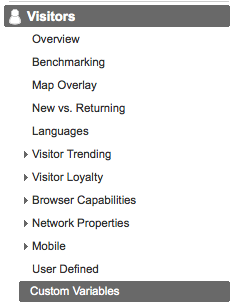
You can see the behavior of your users by logging into your Google Analytics report and going to Visitors>Custom Variables

From there you will see the column “Custom Variable” with the value “RegisteredUsers”. Clicking on the “RegisteredUsers” link will bring up the report on individual users. You can drill down further and discover all kinds of interesting bits of information about your users.

Free to use and distribute

You are free to use and distribute this application as you wish. I just ask that you leave the attributions in place.

Also, it would be great to hear what you think of the Plugin, how your organization is making use of it, and suggestions for future iterations.

Download:

38 Comments

  1. Fred says:

    Great plugin, I just installed it. Waiting for the data to flow in. Strange, no one else have done this before! Thanks!

  2. Alex Cruz says:

    I have been lookng for something like this for weeks now. Thanks, GA track regular visitors well, but we wanted to know about registered users and how they interact with our service. Amazing job, and look forward to seeing registered user stats.

  3. David says:

    Will this work if I don’t have registered users. Right now I am working on a j site w/o reg users but I want to use this plugin for it’s fast loading capabilities.

    Btw, this came just in time. I will be working on a site for teacher/student soon, and this is going to be a keystone plugin.

    Thanks I will provide you with feedback.

  4. Lary Stucker says:

    @David – Yes it will work perfectly even without registered users. Thank for the feedback!

  5. Gosa says:

    Nice article/plugin. Good job Larry.

    If you ever on thinking to make a component with frontend dashboard for free.
    I will be the first one to use it :-)

  6. Lary Stucker says:

    @Gosh – Thank you. What would the use case be for a frontend dashboard to this Joomla/GA plugin?

  7. Mark says:

    Strange, I can’t see any reference to “RegisteredUsers” in Visitors > Custom Variables. I have activated “Track registered users in Google Analytics” in the Plugin, which is enabled. Google analytics working, but can’t see any Reg User reporting at all? Have I missed something?

    • Lary Stucker says:

      @Mark – How much time has passed since you activated the plugin? You need at least 24hours for data to make its way into the report.

  8. kamran says:

    Dear friends, i’m new to this field and i have downloaded FreshClicks’ Google Analytics plugin, but plz is there any one to guide me that what should i do with this zipped file, where should i place it in my site folder.

  9. Stephen Siu says:

    I have some dental course material in articles that I am restricting to registered users. Would this be able to track which users have viewed each of my course material articles? I’m trying to run a report so I can award credits based on attendance (viewing of the article).

  10. Chris says:

    Thanks for this plug-in. Its great! But how do i view a list of the individual pages each registered user visited?

  11. Osi says:

    I was going to write such a plugin for joomla 1.6 to use on a clients site. It Seems like the code doesnt quite play nice with joom 1.6
    Fatal error: Call to a member function isAdmin() on a non-object in /… /plugins/system/fcga/fcga.php on line 22

    if i make changes to your code, can i send them to you or some public repos?

    • Lary Stucker says:

      @Osi – That would be great! I haven’t ventured into J!1.6 yet becuase other modules I typically rely on haven’t been ported over yet. Just indicate where in the code you made changes and I’ll give you credit in the notices.

  12. Fred says:

    Great plugin! I have implemented and it tracks nicely. BUT is there any way to track which specific page a user visit? I have been clicking around, without any luck. Am I missing something?

    I look forward to your replay.

  13. Danny Simms says:

    Apart from adding this plugin, do I need to add any other Google Analytics plugins to my Joomla site?

    It is now 4 days since Iinstalled freshcliks and nothing has showed up yet in Analytics although lots of visitors have visited my site.

    Thanks for any advice and sorry if it is a dumb question.
    Kind regards
    Danny

  14. cedric says:

    +1 Kudos to you! This was exactly what my client is looking for.

  15. Heather says:

    Great plugin! I have the same question that a few others have. Is it possible to view the individual pages that the registered users have viewed? Any help you can provide would be greatly appreciated. Thanks so much!!

  16. marcin says:

    Hi, accidentally I’ve installed version from 1.5 on top of joomla 1.6.
    The site crashed, joomla administration as well.
    Every response returns:

    There is no way to uninstall it and recover previous state through web admin.
    Could you point me to the file set to remove/modify? ftp is the only channel to the site :(
    Thanks in advance!

    • Lary Stucker says:

      @Marcin – Ouch! If you need to manually uninstall use FTP and browse to /plugins/system/ in your Joomla directory and remove fcga.php and fcga.xml

  17. [...] you are using the Google Analytics plugin for Joomla, or some custom built system to track individual users behavior in Google Analytics, you may want [...]

  18. Since Google says it’s not possible to filter by Custom Variables (like you used to be able to do with the User-Defined variable) is there anyway to get the plugin to ignore super administrators?
    I am logged into my site all day and I really miss being able to ignore my activity on the site.

  19. Hi. Great Plugin :)
    I wanted to add speed test in google analytics so i can analyse how long time it takes to load the different pages….

    I then have to add something like this to the code if I understand correct:
    _gaq.push(['_setSiteSpeedSampleRate', 5]);
    _gaq.push(['_trackPageview']);

    As I am using this plugin, i guess i cant add it or is there a work around somehow?

    Kind Regards
    Morten

  20. Paolo says:

    As Fred mentioned above: is there a way to add custom variables to individual pages with this plugin? Or setting other visitor level or session level CV?

  21. Brian says:

    Hello Larry

    Does your plug-in track whether a visit to the website ended in an order? In other words is any script added to the confirmation page at checkout? What I’m looking to do it get accurate results on Adwords spend.

    Cheers
    Brian

  22. Lary Stucker says:

    Brian,
    This plugin deals specifically with registered user tracking. There are so many variables associated with adding the proper JavaScript tags to track all eCommerce activities in Google Analytics.

  23. Alex says:

    This is just what I want. Thank you! Somehow, after I enable the plugin I am not seeing the GA code appear anywhere in my joomla page source on any pages of my site. Am I missing something? I am not getting any errors.

  24. Alex says:

    It is very strange. I did a fresh Joomla install and the plugin works exactly as advertised. However, on the real site it prints nothing. I cannot find what is preventing the plugin from writing its output. Any ideas how to figure this out anyone? Thanks!

  25. Alex says:

    OK – I figured it out. Probably won’t be too much help to others as it’s a very specific problem. It turns out a plugin I has installed (RokModuleOrder) was preventing this plugin from being able to print it’s output. Once I got rid of that plugin all was well. Thanks!

  26. Jorge Mario says:

    HI, I have inserted the analytics code in my Index.php, but I want to use this plugin right now. So is necessary to delete the code inserted in my index.php?

    thanks

  27. MR says:

    It’s not working on my webside. The code is insert at the bottom. I need to insert it in the top. After turning the plugin off and deinstall it, the code is still insert, and it’s not possible to insert it manuel on another position.

    What’s to do to remove the code from my webside?

    • Lary Stucker says:

      If you deactivate the plugin, the code will not show. If it is still there it is likely because of a cache, or another plugin you have activated.

Trackbacks / Pings

  1. [...] you are using the Google Analytics plugin for Joomla, or some custom built system to track individual users behavior in Google Analytics, you may want [...]

Leave a Reply

Your email address will not be published. Required fields are marked *

*

You may use these HTML tags and attributes: <a href="" title="" rel=""> <abbr title=""> <acronym title=""> <b> <blockquote cite=""> <cite> <code> <del datetime=""> <em> <i> <q cite=""> <strike> <strong>